
Printer Out plugin for Data Loggers
Latest version: 5.0.1 build 1126. November 28, 2025.
The Printer Out module sends parser variable values to any Windows-compatible printer as soon as a data packet is received and processed. It supports local, network, USB, LPT, and COM printers as well as virtual printers such as PDF or XPS drivers. For environments that require a hard copy of each message - for example, alarm, security, or compliance logging systems - this module provides reliable, immediate printing and optional digital archival.
What the module provides: practical examples
Example 1: An intrusion detection sensor sends a status packet every time its reed switch changes state. The parser extracts variables SENSOR_ID, STATUS, and EVENT_TIME. The printer module prints a single line with the sensor ID, status, and timestamp to the default printer. A paper log is produced for an on-site security officer to sign.
Example 2: A fire panel sends an alarm packet. The parser exposes variables PANEL, ZONE, ALARM_TYPE, and EVENT_TIME. The module adds a new line to a report with a custom header that includes the facility name and the {DATE_TIME} internal variable. A PDF virtual printer is used to create an archival copy for the incident.
Example 3: A telemetry gateway sends periodic readings. The parser exposes variables TEMP, HUMIDITY, and READING_TIME. Using "Multiple variables" mode and 25 lines per page, the module output the readings history to a ready-to-use report.
Formatting, headers, footers, margins
Basic formatting assigns a variable to print and optional text that appears before or after the variable value. Advanced formatting uses a small HTML-like template with substitute variables in braces, such as {VALUE}. Internal substitute variables include DATE, TIME, DATE_TIME, and PAGE_NUMBER. Only one formatting mode can be active at a time.
Headers and footers may be enabled independently. Height is specified in millimeters (default header 20 mm). Margins are set in millimeters for all four edges. The footer in DOS text mode prints after the configured number of lines while in Windows mode the footer prints at the bottom of the page.
Integration with Advanced Serial Data Logger - example
Scenario: An access controller sends a line when a door opens. Serial data example received by the parser:
USER_ID=U123;DOOR=Main;EVENT=Open;EVENT_TIME=2025-01-02 08:00:00
Parser variables exposed to the module:
USER_ID = U123
DOOR = Main
EVENT = Open
DATE_TIME_STAMP (parser variable name for timestamp) = 2025-01-02 08:00:00
Printer template (basic):
Text before the variable: "Access event: "
Variable: USER_ID
Text after the variable: " | Door: {DOOR} | Event: {EVENT} | Time: {DATE_TIME_STAMP}"
Result sent to a physical or virtual printer (single line):
Access event: U123 | Door: Main | Event: Open | Time: 2025-01-02 08:00:00
Key features
- Immediate print on packet receipt - print as soon as parser provides variables.
- Local and network printer support - USB, LPT, COM, and network printers.
- Virtual printer support - PDF and XPS for digital archiving.
- Windows and DOS text output modes - optimized for dot-matrix and modern printers.
- Advanced templates - HTML templates with substitute variables such as {DATE_TIME_STAMP}.
Brief summary
The module prints parser variables immediately to physical or virtual printers, offers both graphics and text modes, and supports templates with placeholders for parsed variables. You can configure a printer, output mode, and templates to generate consistent, auditable paper or digital records.
How to enable this plugin
The figure below shows how to select the plugin on the "Modules" page.
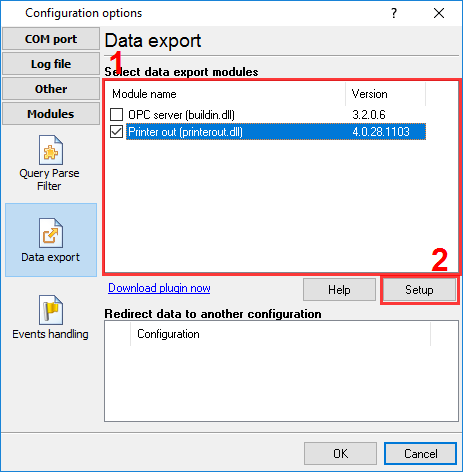
Fig.1. Selecting the plugin.
How to configure the plugin
The figure below shows how to configure the plugin to poll the device every 15 seconds. Of course, you may change the poll interval as you want.
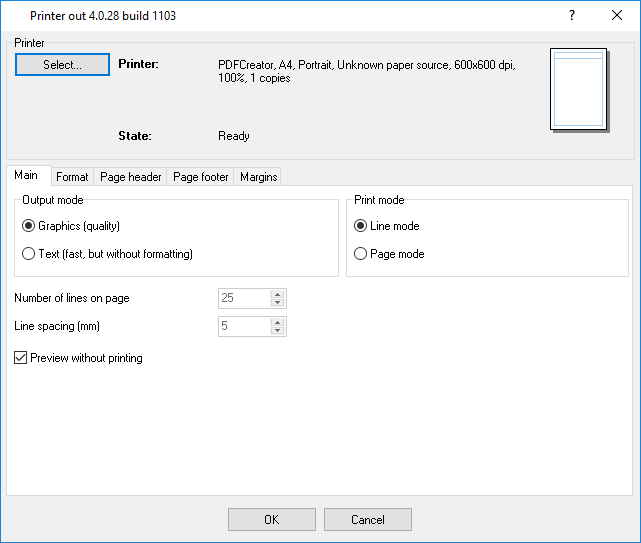
Fig.2. Configuring the plugin.
Read more about other plugins:
All plugins | SQL Database Professional | Cloud Database Professional | ODBC database | Direct Excel/OpenOpffice Calc/LibreOffice Calc Connection | Google Sheets Professional | Excel Export Professional | Send keystrokes | DDE Server | Local (desktop) database | Geo Export | Printer out | Web Server | HTTP POST GET & InfluxDB Export | SFTP Export | MQTT data receiving and publishing | OPC UA Server